 WhySlow
An Activity Monitor alternative that explains what you see
Activity Monitor is a good tool that answers “what is running?”. When your Mac is slow, the question is “why, and what should I do?”. WhySlow answers that one, in plain English, on your own Mac.
Activity Monitor and WhySlow, side by side
| Activity Monitor | WhySlow | |
|---|---|---|
| Price | Free, built into macOS | Free to explain, $7 once for one-click fixes |
| Shows CPU, memory, energy, disk and network | Yes, in detail | CPU, memory, disk space and network, summarized |
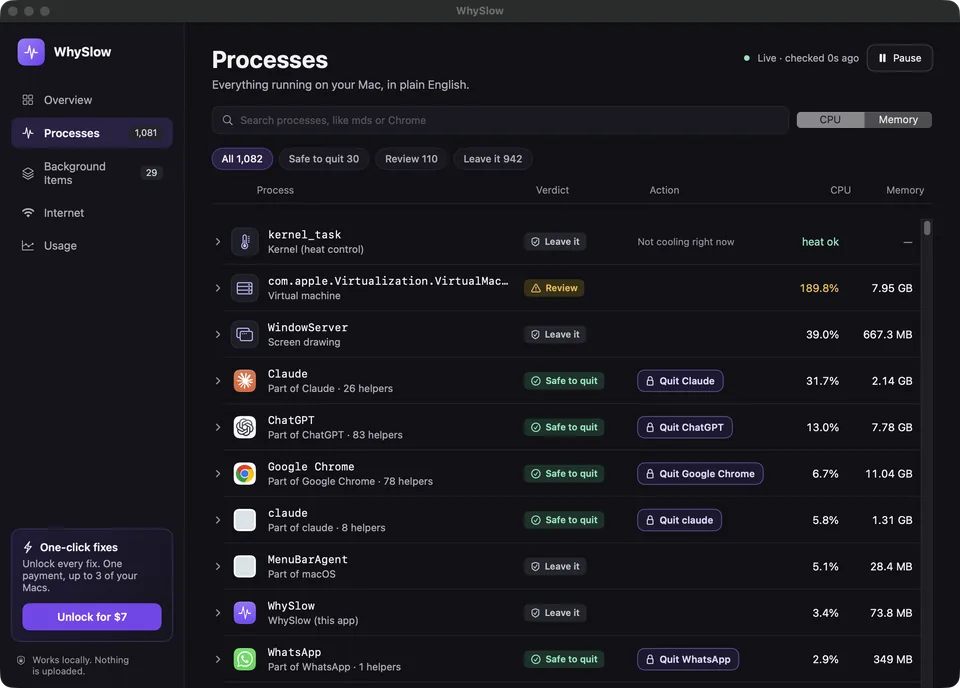
| Explains what a process is | No, shows its name | Yes, 85 common processes in plain English |
| Says whether it is safe to quit | No | Yes, and refuses to quit macOS system processes |
| Names the likely cause of a slowdown | No, you interpret the numbers | Yes, from heat, memory pressure, indexing, busy apps and more |
| Groups helpers under their app | Partly, in a hierarchical view | Yes, Chrome, Electron and other helpers roll up under one app |
| Browser tab cleanup | No | Finds duplicate tabs in Chrome-family browsers and closes the ones you pick |
| Internet speed check | No | Yes, using Apple’s built-in networkQuality |
| Usage history and upgrade advice | No | 30 days on your Mac, with advice on whether more memory would help |
| GPU history, sampling, force quit any process | Yes | No; use Activity Monitor for deep inspection |
When Activity Monitor is enough
If you already know what kernel_task, WindowServer and mds_stores do, and you are comfortable reading the Memory Pressure graph, Activity Monitor gives you everything. It also has tools WhySlow doesn’t: GPU history, per-process sampling, open files and ports, and force-quitting any process. WhySlow doesn’t replace those; it sits in front of them.
When you want answers instead of numbers
Most people open Activity Monitor, see a list of unfamiliar names, and search each one. WhySlow does that step for you. It reads the same system information, explains each process the way the process library does, and puts the likely cause at the top: “Your Mac is hot, so macOS is slowing apps down” rather than “kernel_task 240%”.
It also asks before every action. Quitting an app group, closing tabs or rebuilding the Spotlight index each needs your confirmation, and macOS system processes are never offered for quitting.
Is WhySlow a Mac cleaner?
No. Cleaner apps delete caches and files to free space. WhySlow doesn’t delete files or “boost” memory. It tells you why your Mac is slow and what will actually help, and when the answer is “your disk is nearly full”, it says so plainly.
Other options
Menu bar monitors show live CPU and memory graphs while you work, which is useful if you like watching numbers. Terminal tools such as top come with macOS and show the same process list as text. Choose whichever fits how you work; many people keep Activity Monitor for deep dives and use WhySlow for the quick “why”.
Free to explain. $7 once for one-click fixes. macOS 15 or later.